Tag: arcade
-
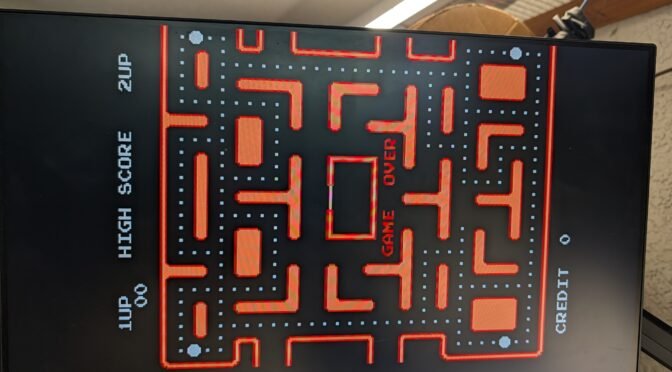
Ms. Pac-Man with no “Sprites” (Ghosts, Ms. Pac-Man)
So, a gentleman reached out to me right before my fusion surgery asking me to have a look at his Ms. Pac-Man game. It was not showing sprites but was otherwise behaving correctly – it passed self test, and you could still see dots being eaten during attract mode, etc. Initial instinct was something wonky…
-
“Untested” Ms. Pac-Man PCB – Repaired
Ordered an untested Ms. Pac-Man board off eBay for a fair price. As an aside, remember that “untested” means the exact same thing as broken, especially when dealing with older hardware. Older hardware (games) should be presumed to be broken unless proven otherwise, so bid/price accordingly.
-
Latest Version of CoinerUp!
So more than a decade ago while I was in-between jobs (pay close attention to the manager red flags post) I tried my hand at a simple Arduino solution for using the Konami code in creative ways and I settled upon using it in a way to credit a game without having to add an…
-
Credit Devices for Free Play Usages
So events like Free Play Florida (https://www.jrtwine.com/blog/?p=643) highlight the importance of actually having a way to play a game for free. To that end I am thinking of making available some minimally invasive button kits that can quickly be added to a game, to gain the ability to credit the game without opening it up.
-
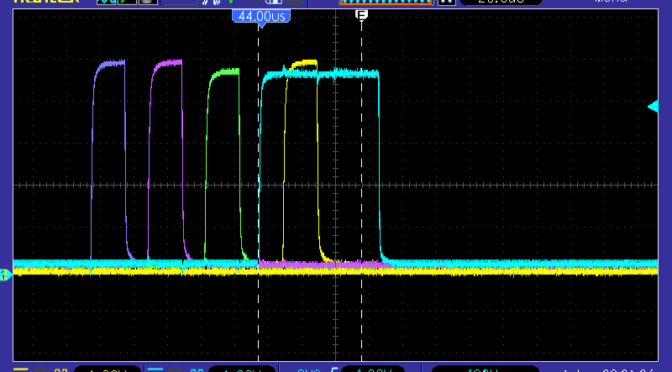
Possible Bug in Bally Pinball Firmware?
I am seeing something across multiple classic Bally pins that makes me think it is an actual bug in the firmware. It has to do with the LATCH signals for the displays. Specifically the Credit/Match/Ball (CMB) display.
-
Galaga Board with Enhancement Pack not Booting
I finally got around to working on a Galaga board for AM and I got it up and running and was leaving it on for a 24-hour test when it crapped out showing a error on ROM 39 (which does not exist). This eventually degraded into a state where it did not display any errors…
-
Theory of Operation of the Shaq 27722-1 (A23) LED Display Board
Theory of Operation of the Shaq 27722-1 (A23) LED Display Board (4-player score board).Theory of Operation of the Shaq 27722-1 (A23) LED Display Board (4-player score board). Theory of Operation This is a brief technical introduction to the operation of the 27722-1 (A23) board. It will cover inputs and behavior of the board. Inputs This…
-
Spies Cross Reference List
There is an old cross reference list archived on Spies and replicated by a few arcade-related sites. I took this list and reformatted it, removed empty entries and made some items clickable for easy searching.
-
Words to Watch Out For When Buying Arcade Games or Pinball Machines
I have learned through many years of posts, sales, people, auctions, and similar experiences that there are certain words and phrases that you need to watch out for when buying games, boards, etc. Untested The first one, and it is a biggie – UNTESTED. Here is the truth: if dealing with a whole game, and it…
-
Dead Gorf
So I found a dead Gorf on Craigslist. It was an older ad, but was still available when I inquired. Dude I picked it up from had done some pretty impressive restorations on some other games. Anyway – it was dead alright. Shows a blank screen that looked overly blue due to how the monitor…